News Center
Stay updated with the latest news and industry insights.
How to Buy Malaysia Native IP VPS?Full Review & Purchase Guide
2026-07-14 13:27:00 Native IP Malaysia VPS
Malaysia native IP VPS is a cost-effective choice for localized deployment in Southeast Asia. All IPs are allocated from local Malaysian native network segments with accurate geolocation, covering multiple nodes such as Kuala Lumpur and Saicheng. It offers a wide range of configuration tiers with both Linux and Windows system support, and monthly prices start from $8.40, making it an excellent option for Malaysia and Southeast Asia localized businesses. There are multiple plans with different specifications available for sale to meet diverse needs from lightweight testing to heavy-duty operation. Below are the current mainstream and popular native IP models.
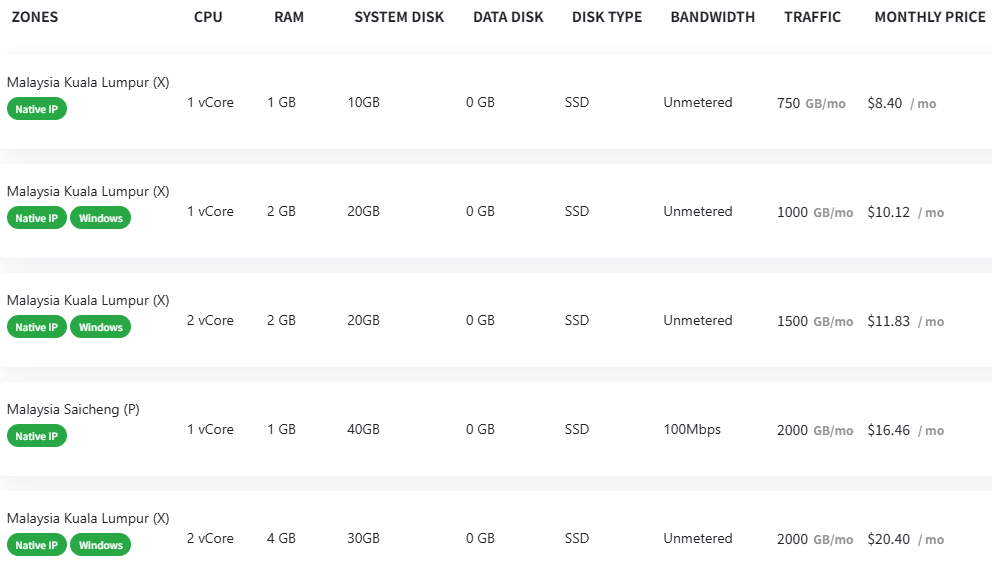
Mainstream Popular Native IP Plans Available
1. Kuala Lumpur Zone X 1vCore/1GB Native IP Linux Plan | $8.40/mo
This is the lowest-priced entry plan for Malaysia native IP VPS, with 1 vCore CPU, 1 GB RAM, 10GB SSD system disk, unmetered bandwidth and 750GB monthly traffic, Linux only. It is suitable for low-load scenarios such as lightweight script deployment, single-site hosting and localized environment testing, and is the top choice for low-cost trial of the Malaysian market.
2. Kuala Lumpur Zone X 1vCore/2GB Native IP Windows Plan | $10.12/mo
As the entry-level native IP plan with Windows support, it is equipped with 1 vCore CPU, 2 GB RAM, 20GB SSD system disk, unmetered bandwidth and 1000GB monthly traffic. Its RAM is sufficient for smooth basic Windows system operation, suitable for lightweight remote desktop, small Windows application hosting and basic localized verification, delivering excellent cost-effectiveness.
3. Kuala Lumpur Zone X 2vCores/2GB Native IP Windows Plan | $11.83/mo
This plan upgrades to dual-core CPU, paired with 2 GB RAM, 20GB SSD system disk, unmetered bandwidth and 1500GB monthly traffic, retaining native IP and Windows support. It delivers significantly improved multi-task processing capability, suitable for medium-load Windows businesses, multi-program parallel operation and small and medium-sized localized site deployment.
4. Saicheng Zone P 1vCore/1GB Native IP Linux Plan | $16.46/mo
An exclusive native IP plan for the Saicheng node, with 1 vCore CPU, 1 GB RAM, 40GB large-capacity SSD system disk, fixed 100Mbps bandwidth and 2000GB monthly traffic, Linux only. Its core highlights are large system disk and high traffic quota, suitable for Linux businesses requiring large storage and high-frequency data transmission.
5. Kuala Lumpur Zone X 2vCores/4GB Native IP Windows Plan | $20.40/mo
Positioned as the mainstream performance plan in the native IP Windows category, it is equipped with 2 vCore CPU, 4 GB large RAM, 30GB SSD system disk, unmetered bandwidth and 2000GB monthly traffic. With fully upgraded computing power and RAM, it stably supports heavy-load localized businesses such as multi-account operation, medium-scale Windows service deployment and data relay.
Buying Process & Selection Guide
1. Match configuration to your needs
First clarify your system requirements, computing load, traffic consumption and storage needs. Prioritize the entry plan for pure Linux lightweight needs, the 1vCore/2GB plan for basic Windows needs, the 2vCores/2GB plan for medium load, the Saicheng node plan for Linux businesses with large storage and high traffic needs, and higher-end native IP plans for heavy Windows businesses.
2. Choose billing cycle
Multiple billing cycles such as monthly, quarterly and annual are usually available. Monthly billing is suitable for short-term testing and flexible businesses. For long-term stable operation, annual billing is recommended, which usually comes with additional discounts for lower long-term cost.
3. Order and activation process
After confirming the configuration and cycle, select the corresponding Malaysia native IP plan, choose system image and add-on services as needed, submit the order and complete payment. The server will be activated automatically after successful payment, and you will receive login credentials and IP information shortly.
4. Post-purchase usage & support
After activation, you can deploy your business environment and configure security policies on your own.