News Center
Stay updated with the latest news and industry insights.
Is Curaçao Native IP VPS Worth It? Full Guide and Purchase Steps
2026-01-26 13:24:00 Native IP Curaçao VPS
If you're thinking about buying a VPS with a Curaçao native IP, this guide will help you understand its advantages and how to purchase one.
Advantages of Curaçao Native IP VPS
Native IP & Residential IP
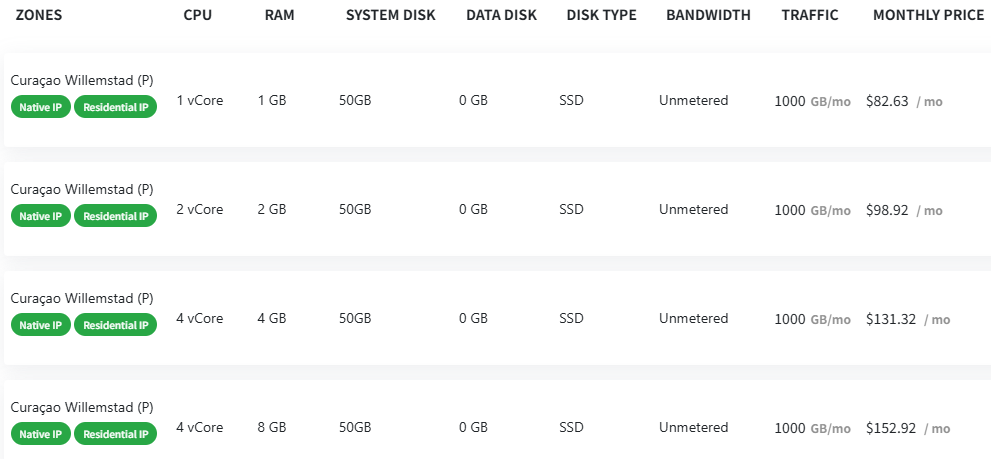
As shown in the picture, these VPS packages come with "Native IP" and "Residential IP," meaning the IPs are real residential addresses, not data center IPs. This is especially useful when you want to bypass website restrictions or anti-fraud checks, providing higher privacy and trust.
Diverse Configurations
The CPU ranges from 1 vCore to 4 vCores, RAM from 1GB to 8GB, and all come with 50GB SSD system disks, suitable for different needs from light to heavy workloads.
Bandwidth and Traffic
Bandwidth is unmetered (unlimited speed), but monthly traffic is capped at 1000GB, which is sufficient for most small to medium users.
Clear & Reasonable Pricing
Prices range from $82.63 to $152.92 per month, depending on the configuration, offering good value with SSD storage ensuring speed and stability.
How to Buy Curaçao Native IP VPS?
1. Register an Account on VDEcloud
The first step is to register an account on the VDEcloud platform. This platform offers Curaçao native IP VPS services. After registration, you can browse various VPS plans that support "Native IP" and "Residential IP" with suitable disk, bandwidth, and traffic options.
2. Pick Your Configuration
Choose CPU and RAM based on your budget and usage. For example:
For light tasks or testing, 1 vCore, 1GB RAM at $82.63/month is good enough.
For higher performance, 4 vCore, 8GB RAM at around $152.92/month.
3. Place the Order
After selecting a plan, fill in your personal info and choose a payment method like credit card or PayPal to complete the purchase.
4. Setup & Manage
Once purchased, you will receive credentials to remotely access your VPS and deploy your projects.