News Center
Stay updated with the latest news and industry insights.
How to Choose Albania VPS? Step-by-Step Native IP Server Buying Guide
2026-03-02 15:57:00 Native IP Albania VPS
Albania’s network infrastructure is developing steadily, and choosing a VPS with a native Albanian IP means the IP address is truly assigned to Albania. This is especially helpful for regional network testing, accessing local services in Albania, or bypassing geo-restrictions.
VPS Configurations and Pricing Overview
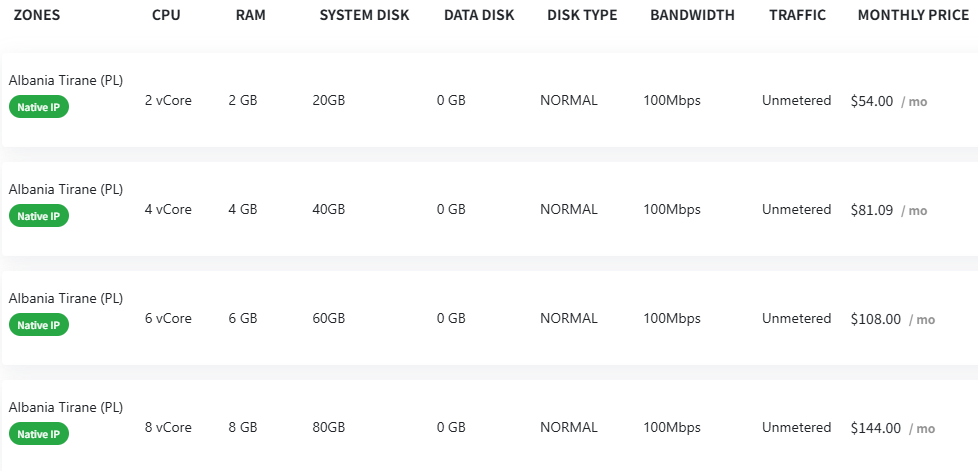
Based on the image, the Albania Tirane (location code PL, likely data center code) offers several VPS configurations, ranging from low to high specs:
2 vCore CPU, 2GB RAM, 20GB system disk, 100Mbps bandwidth, unmetered traffic, $54/month
4 vCore CPU, 4GB RAM, 40GB system disk, 100Mbps bandwidth, unmetered traffic, $81.09/month
6 vCore CPU, 6GB RAM, 60GB system disk, 100Mbps bandwidth, unmetered traffic, $108/month
8 vCore CPU, 8GB RAM, 80GB system disk, 100Mbps bandwidth, unmetered traffic, $144/month
All come with a “Native IP” label, meaning the IP addresses are genuinely allocated to Albania.
Key Features Analysis
1. Bandwidth & Traffic: With 100Mbps bandwidth and unlimited traffic, this setup is excellent for users needing consistent server uptime without worrying about extra bandwidth charges.
2. Hardware Resources: Options from 2 cores and 2GB RAM up to 8 cores and 8GB RAM cover a wide range of use cases, from simple websites to medium-sized applications.
3. Disk Type: The disk type is “NORMAL,” which probably means traditional HDD instead of SSD, so consider the speed vs price tradeoff.
4. Geographical Advantage: Having a native Albanian IP reduces latency and increases local speeds, ideal if your target audience or services are Albania-based.
How to Buy?
Buying is usually straightforward:
1. Select Specs: Choose CPU, RAM, and disk space according to your needs.
2. Create Account: Go to the VDE website and register an account.
3. Place Order & Pay: Pick the Albania Tirane node, select your configuration, and pay the monthly fee.
4. Setup & Use: After payment, get access to the VPS immediately, log in, and start setting up your environment.
Make sure to check if the provider supports your preferred OS and management method (SSH, remote desktop), and verify their customer support quality.