News Center
Stay updated with the latest news and industry insights.
When it comes to VPS with native US IP, many wonder if it’s worth it and how the performance is. Actually, these VPS have several clear advantages: first, the IP addresses are native, meaning better network quality, faster access, and less chance of being blocked or restricted—ideal for overseas business or development testing. Also, popular locations like Los Angeles and Washington DC offer various bandwidth and traffic options to meet different needs.
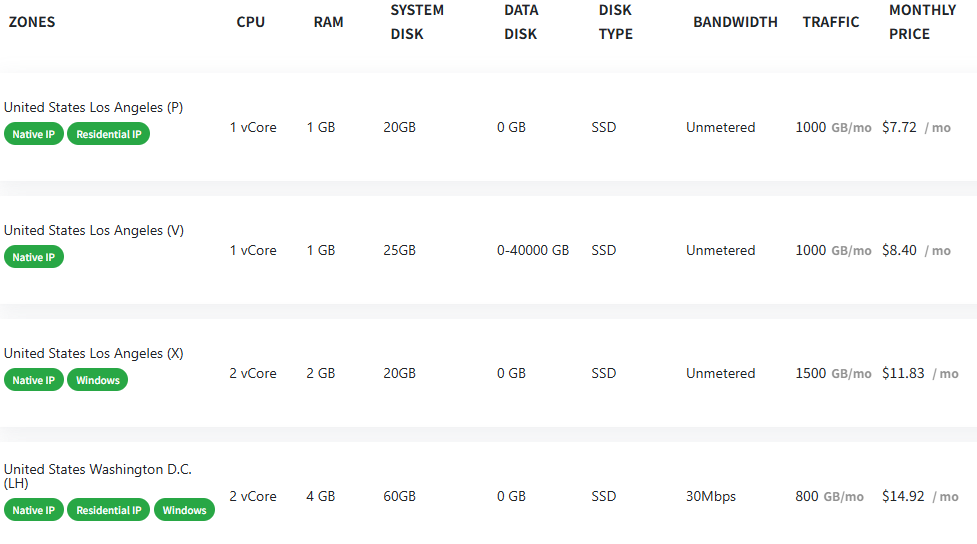
From the screenshot, we can see that providers offer multiple VPS plans in Los Angeles and Washington with different specs and prices:
Los Angeles (P) Node: 1 vCore CPU, 1GB RAM, 20GB system disk, 1000GB traffic, $7.72/month. Comes with native IP and residential IP options, great for light users.
Los Angeles (V) Node: 1 vCore CPU, 1GB RAM, 25GB system disk, bandwidth from 0-40000GB, $8.40/month, suitable for heavy traffic scenarios.
Los Angeles (X) Node: 2 vCore CPU, 2GB RAM, 20GB system disk, 1500GB traffic, $11.83/month, supports Windows, better performance and system flexibility.
Washington DC (LH) Node: 2 vCore CPU, 4GB RAM, 60GB system disk, 800GB traffic, 30Mbps bandwidth, $14.92/month, supports Windows, good for users needing more memory and disk space.
How to Buy a US Native IP VPS?
1. Choose Location and Specs: Decide the location (LA or Washington) and pick the plan based on CPU, RAM, disk, and traffic.
2. Confirm IP Type: Make sure the plan includes “Native IP” to get high-quality native addresses.
3. Select Operating System: Most plans default to Linux; if you need Windows, select plans labeled “Windows.”
4. Place Order: Register on the provider’s website, pick your plan, and pay online to activate.
5. Setup and Use: After activation, you’ll get login info and can connect via Remote Desktop or SSH to deploy your projects.