News Center
Stay updated with the latest news and industry insights.
How to Choose and Purchase a French Native IP VPS? A Practical Guide
2026-05-26 13:23:00 Native IP France VPS
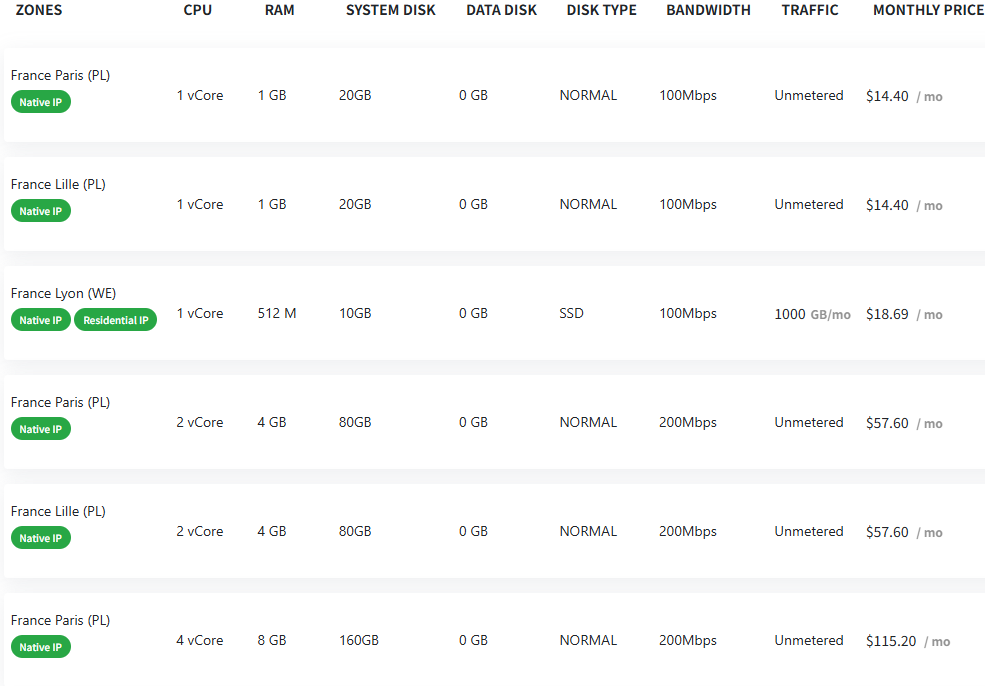
If you need a VPS with a genuine French native IP, especially to access French local services more smoothly or optimize your website for French users, choosing a VPS with a "Native IP" tag is a great option. The image above shows various VPS plans located in different French cities with their specs and pricing.
Advantages of French Native IP VPS
1. True French IP
These VPSs come with actual French IP addresses, so you won’t get blocked as a proxy or VPN, ensuring stable access to French internet services.
2. Multiple Location Options
You can choose between Paris, Lille, or Lyon. Different locations might offer slightly different network environments, suitable for various purposes.
3. Diverse Configurations
From entry-level 1vCore/1GB RAM to high-end 4vCore/8GB RAM, you can pick according to your performance needs and budget.
4. Unmetered Traffic & Good Bandwidth
Most plans offer 100Mbps or 200Mbps bandwidth with unmetered traffic, so no worries about overage fees.
5. Reasonable Pricing
Prices range from $14.40/month for basic plans to $115.20/month for high-end options, suitable for different users.
Configuration Highlights
Basic plans like Paris and Lille with 1vCore, 1GB RAM, 20GB disk, 100Mbps bandwidth at $14.40/month are good for light tasks.
Mid-tier plans with 2vCore, 4GB RAM, 80GB disk, 200Mbps bandwidth at $57.60/month suit moderate workloads.
High-end plans with 4vCore, 8GB RAM, 160GB disk, 200Mbps bandwidth at $115.20/month are for demanding applications.
Also, Lyon offers a unique plan with 512MB RAM, 10GB SSD, and Residential IP, limited to 1000GB traffic, great for specific use cases.
How to Buy?
1. Choose your preferred location and configuration
Pick the city, CPU, RAM, disk size, and bandwidth based on your needs.
2. Register and log in
Visit the VDEcloud official website, sign up, and log in.
3. Place an order
Add your chosen VPS to the cart, fill in details.
4. Make payment
Use the available payment methods to pay and get your VPS credentials.
5. Set up and use
Log into your VPS and start configuring your services or apps.