News Center
Stay updated with the latest news and industry insights.
How to Buy a VPS with Native Brazil IP: Step-by-Step Guide
2026-01-04 13:03:00 Brazil VPS Brazil server
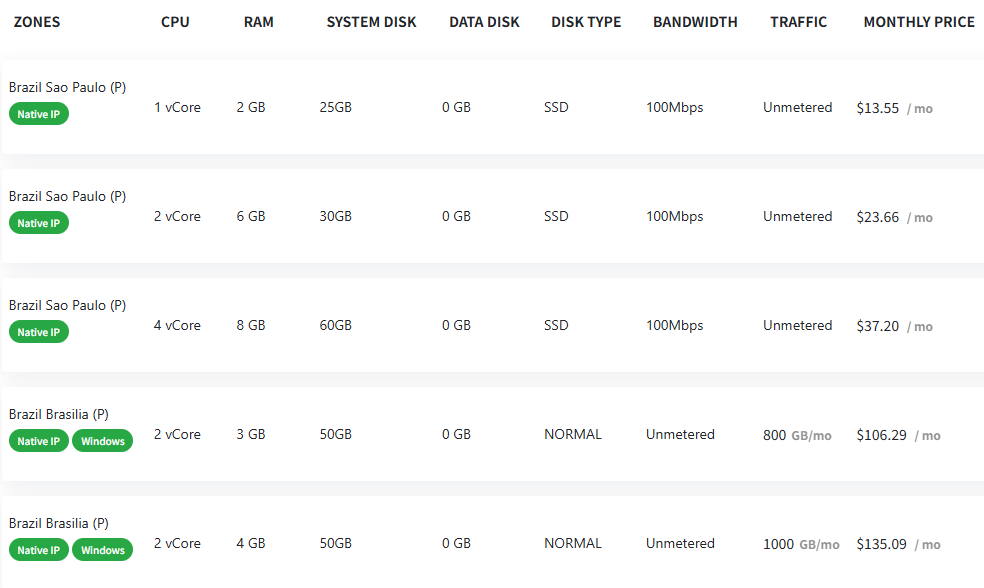
With the rise of cross-border business and local market demand, Brazil native IP VPS is getting more and more popular. To put it simply, this type of VPS comes with a real, local Brazilian IP address. That means it works faster and is especially suitable if you’re running projects aimed at the Brazilian market. Now, let’s take a look at the configurations and prices in the image above, and talk about how good these Brazil native IP VPS are, and how you can buy one smartly.
一. Analyzing the VPS Packages and Prices
Let’s look at the chart above, which shows several VPS packages—all with native Brazilian IPs:
1 vCore / 2GB RAM / 25GB SSD / $13.55 per month
The entry-level option, great for lightweight projects or simple testing.
2 vCore / 6GB RAM / 30GB SSD / $23.66 per month
A bit more power for bigger websites or apps.
4 vCore / 8GB RAM / 60GB SSD / $37.20 per month
Ideal if you need more stability and performance for demanding tasks.
2 vCore / 3GB RAM / 50GB NORMAL Disk / $106.29 per month (Brasilia)
Comes with Windows and a different disk/storage setup, plus traffic limits—notice how the price jumps.
2 vCore / 4GB RAM / 50GB NORMAL Disk / $135.09 per month (Brasilia)
Even higher specs and traffic, but pricier.
Notice: Sao Paulo plans are more affordable and use SSD storage, plus they offer 100Mbps bandwidth with unlimited traffic. Perfect for projects that need to stay online without worrying about usage.
二. How to Pick the Right Plan?
1. Know Your Needs
For simple tasks or testing, the lowest tier is fine. If you want to run a business site or marketing project, go for 2 vCore/6GB or 4 vCore/8GB for better performance.
2. Check the Operating System
Some packages offer Windows—handy if you need remote desktop or specific Windows apps.
3. Set Your Budget
Brazilian VPS servers tend to be pricier than US or EU options, because resources are scarcer. Start with what you need, and upgrade later as your project grows.
三. How to Buy a Brazilian VPS?
Buying is straightforward:
1. Register an Account
Go to the VPS provider’s website and sign up.
2. Choose Your Package
Pick the configuration that suits you (CPU, RAM, disk, OS).
3. Pay for Your Selection
Fill in your details, choose a payment method (credit card, PayPal, Alipay, etc.), and pay.
4. Wait for Activation
Usually, you’ll receive your server info within minutes to a few hours. Then you can log in and get started right away.