News Center
Stay updated with the latest news and industry insights.
How to Choose the Right Hong Kong Native IP VPS for Your Needs
2026-03-21 13:03:00 Native IP Hong Kong VPS
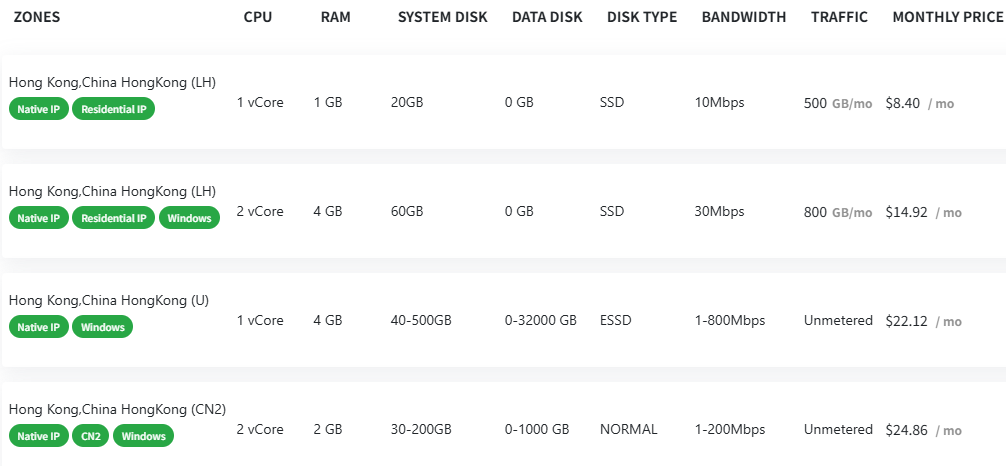
Looking for a VPS with a native Hong Kong IP? It’s easier than you think. The key is to check the specs like CPU, RAM, storage, bandwidth, traffic limits, plus the IP type and OS support. Here’s a quick rundown of some common Hong Kong native IP VPS options to help you pick the right one.
Option 1: Basic Starter
CPU: 1 vCore,RAM: 1 GB,System Disk: 20 GB SSD,Bandwidth: 10 Mbps,Traffic: 500 GB/month,Price: $8.40/month
Great if you just need something basic. SSD ensures decent speed, 10 Mbps bandwidth works fine for light tasks. The mix of native and residential IP means you get a legit Hong Kong IP that looks like a regular user’s – good for avoiding blocks.
Option 2: Mid-Range
CPU: 2 vCore,RAM: 4 GB,System Disk: 60 GB SSD,Bandwidth: 30 Mbps,Traffic: 800 GB/month,Price: $14.92/month
Better specs and higher traffic cap. This one’s solid for small websites or apps that need more power. Windows support is a plus if you’re running Windows-based software. The 30 Mbps bandwidth keeps things running smoothly.
Option 3: High Performance, Unlimited Traffic
CPU: 1 vCore,RAM: 4 GB,System Disk: 40-500 GB ESSD (Enhanced SSD),Bandwidth: 1-800 Mbps,Traffic: Unlimited,Price: $22.12/month
This plan’s got flexible storage and bandwidth, super fast ESSD storage, and unlimited traffic. Ideal if you want speed and no worries about hitting data caps. Plus, Windows is supported for more flexibility.
Option 4: CN2 Network – Optimized for Mainland China Access
CPU: 2 vCore,RAM: 2 GB,System Disk: 30-200 GB HDD,Bandwidth: 1-200 Mbps,Traffic: Unlimited,Price: $24.86/month
This one uses the CN2 optimized telecom network, which means much better speed and stability when connecting to mainland China. If your target audience or users are mostly in China, this is the way to go.
Buying Tips
1. Match specs to your needs: If you’re running light tasks, the basic plan works. For heavy use or big traffic, go for higher specs or unlimited plans.
2. Check IP type: Native IPs are stable and legit; residential IPs mimic real user addresses and help avoid blocks.
3. Pick your OS: Need Windows? Choose plans that support it. Otherwise, Linux works for most cases.
4. Watch bandwidth & traffic: Bandwidth affects speed, traffic caps limit your monthly data — don’t pick too low if you need speed or lots of data.
5. Balance cost and features: Don’t just grab the cheapest one. Consider IP quality, network, and support too.
How to Buy?
1. Head over to VDEcloud’s official website and look for their Hong Kong native IP VPS plans.
2. Compare the specs, prices, IP types, and OS options to find your best fit.
3. Sign up and complete any verification if required.
4. Choose your preferred OS (Linux or Windows).
5. Pay and wait for your VPS to be activated.
6. Use the login info you get to access your server and set up whatever you need.
Having a native Hong Kong IP VPS is a big plus if you need reliable access to Hong Kong or want better cross-border connections. The CN2 line especially shines if your audience is in mainland China, thanks to faster and more stable links. Just remember, don’t base your choice on price alone — IP authenticity, OS support, and network quality matter just as much. Hope this clears things up and helps you find the right VPS!